|
CAD for leather goods and small leather goods |  |
 |
 |
|
CAD for leather goods and small leather goods | |
|
|
| Mozart | Liszt | Virtual-Design | Support | Contacts |
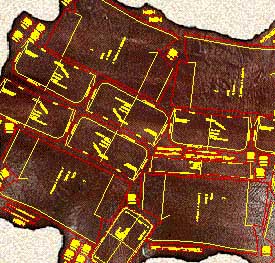
| Mozart is a CAD realized following the requests and
suggestions of leather goods pattern-makers to simplify and expand their work being
them free to design according to their ideas. Mozart requires AutoCAD® or ZWCAD®. The license of Mozart does not include the license of AutoCAD® or ZWCAD® Mozart 8 is available for AutoCAD® up to version 2026 and for ZWCAD® up to version 2025. |
|
Quick learning Built on pattern-makers' requirements Mozart shares his working method giving full liberty to design the model. The pattern-maker can concentrate himself on the model to be realized. He does not have to code the materials or pieces before or during the drawing. Freely customizable The user can easily change many settings of Mozart: colors, the method of calculating the bill of materials and the bill of working times and many other parameters. Mozart can also load and use custom toolbars, scripts and commands written by the user. |
|
|
Flexibility The user is free to choose the names of the patterns and their hierarchy. Each pattern is a single file and Brands, Lines, Seasons etc. can be organized by folders. Each pattern is independent from the others and can be copied or moved in whole or in part from one folder to another like any other file. The bill of materials and the bill of working times can be performed in different ways and the reports are produced as ASCII text or Excel document. |
|
Data exchange The patterns can be read using many others CAD programs. The cutting can be done using a wide range of machines from vertical or flatbed plotters to knife, laser or water-jet cutting machines. The bill of materials, the bill of accessories and the bill of working times can be exported to others data management systems. Development The open structure of Mozart means it can be constantly improved according to users suggestions and requests. The upgrade of Mozart does not oblige the user to upgrade the other components of the CAD system. Plug-ins increase the power and the flexibility of Mozart. |
|
| Plug-ins add specific functions to Mozart. The user himself can write his own plug-ins, Mozart will automatically load them. Plug-ins allow to customize Mozart's installations to the needs of the user and reduce the cost because they avoid the purchase of what is not needed. Users can request the development of personal plug-ins to create special reports or drawing functions. On request personal plug-ins are not available to other users in order to protect their confidentiality. |
When searching for firmware for your Qviart Dual 4K, you will primarily encounter two distinct types. Understanding the difference is the most important step:
Qviart Dual 4K is a versatile combo receiver that stands out for its dual-boot architecture, allowing users to run both Linux Enigma2 Android 9.0
Keep holding the front power button until the front panel LED display indicates that the update process has started (often displaying "UPD" or a progress indicator). Release the button. qviart dual 4k firmware
The Qviart Dual 4K is a powerful receiver whose capabilities are deeply tied to its firmware. Whether you stick with official updates for rock-solid stability or explore the feature-rich PT firmware path, keeping your software current is essential. The active community support ensures that this already versatile dual-boot machine continues to evolve, fixing bugs and adding significant new features with each release, solidifying its status as a favorite among enthusiasts.
Always source your firmware from official development teams to guarantee system stability and shield your hardware from malicious third-party modifications. If you need help configuring your new setup, let me know: When searching for firmware for your Qviart Dual
Because the Qviart Dual 4K supports Multiboot, you can flash Enigma2 images directly from your existing menu if your current software supports it, or use the recovery menu.
As of [current date], the latest Qviart Dual 4K firmware versions are: The Qviart Dual 4K is a powerful receiver
Plug the USB drive into the USB 3.0 port (the blue port) on the side or back of the receiver. Trigger the Flash Process:
: Sometimes, user communities and forums discuss firmware updates, share experiences, and provide links to updates.
All product names, brand names or trademarks named here belong to their respective holders. |